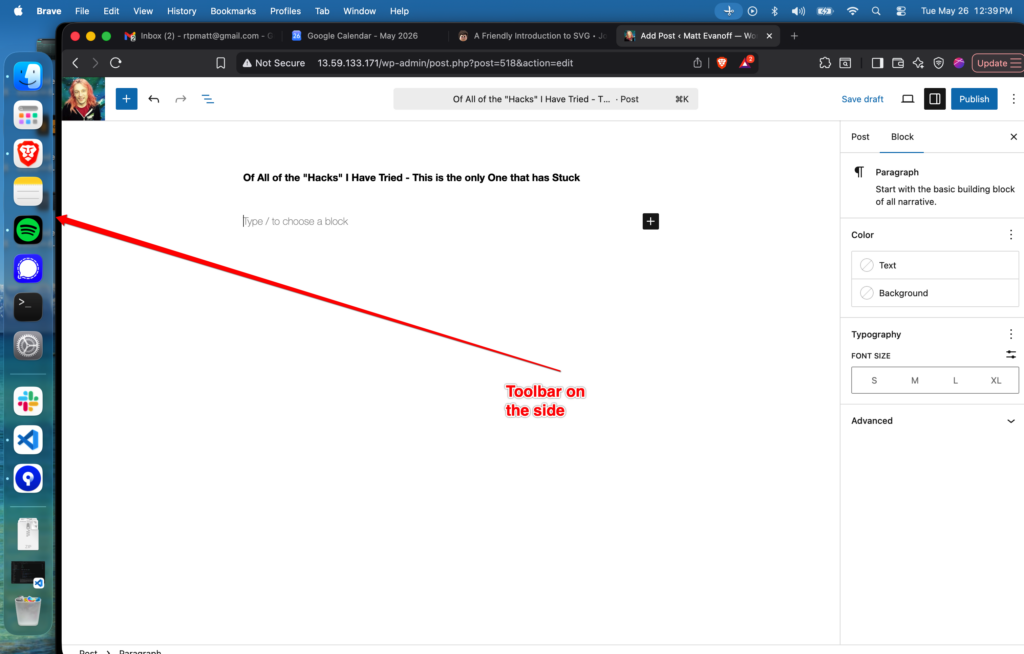
Toolbar on the side. As a developer, vertical real estate is most important.

Toolbar on the side. As a developer, vertical real estate is most important.

Pumpkin pie is one of my favorite pies. A number of years ago I spent a fall cooking all of the different pumpkin pie recipes I could find. Here is a distillation of the best parts of all of them – so this is my definitive Pumpkin Pie Recipe.
It is the worlds best pumpkin pie*
*Note: I mean for me, your opinion might be that this is terrible – people like different things, I am not here to tell you what is good for you.
Ingredients – Makes 2 Pies:
3 eggs - separated
1 C sugar + 1 glug molasses
2 TSP cornstarch
Pinch Salt
1 1/4 C Spiced Pumpkin
1/2 C milk
1 can Evaporated Milk
1 TSP vanilla
+ 2 Pie Crusts
Directions:
Dock and par-bake your pie crusts.
In a large bowl, mix everything except egg whites.
In medium bowl: Beat whites till stiff, then fold into other stuff.
Pour into pie crusts.
Bake @425F for 10 minutes.
lower oven to 325F till toothpick comes out clean – around 30 minutes.
Additional notes: Once mixed, this will keep in a fridge up to a week. The egg whites will deflate over time, so the pie will be more dense the longer you wait to cook it. Both versions are good, hard to say which one is better.
When we write code, we often find ourselves pressured to work faster, sacrificing the quality of the product.
Something We can do as Developers:
Clockmakers leave subtle marks to help guide the next person who has to work on that clock - we developers should do the same, it makes everything better for the next person to work on the code, even when that person is you!
Software Engineering is the field I know best about, and this will probably make little sense to people who are not in it. Specifically FE people in particular might appreciate this post most, as TS is my language de jour.
Double Bang:
Using `!!` at the front of a line, such as:
`const foo = ((thisThis || thatThing ) && (theOther thing && thatOtheThing))`
If you instead write:
`const foo = !!((thisThis || thatThing ) && (theOther thing && thatOtheThing))`
I IMMEDIATELY know that this is going to be a `boolean` with the value of whatever this check returns. Without it, I need to read the entire thing, then I see there is nothing else, say turnary, it’s just straight this.
Ternaries:
Don’t use double (or more) turnaries!! They suck, they are hard to mentally process, and waaaaay too many times I have found bugs specifically because they are bad.
Single ones are totally fine. Double or higher, you need to break it up.
Single ones are fine. Double or higher, you need to break it up.
Again, it sacrifices having code in-line, and instead makes you move things to a function…That I hope you named after what it does! Something something something 2 hardest problems…
IF and Other Statements:
Well, there is too much here to talk about, so I will address the first ones in my mind.
Curly brackets – always use them, unless you can put everything on one line:
“`
if(foo) return bar;
FINE
if (foo) {
Do something!
}
FINE
If (foo)
Do something
BADDDD! – people will add stuff and not realize there are no curly braces, so their thing after won’t actually fire. Putting everything on one line is a Signpost that tells us “there are no braces, this is a stand-alone statement.
Functions:
These can be written several ways!
Obviously there are more, but these are the basics.
These all do different things. There are more, but these are the ones most use, and therefore are the ones we should cover.
Do you know the difference?
#2 Is what is known as a “function expression” – these are special.
When you use #2 for function is always there (see: function scoping)
I use this option specifically when I have a lot of code, I take advantage of “hoisting” and put these at the bottom, because I am satisfied with name “removePersonFromEmail()” to be a Signpost that tells me what is happening here. It also preservers the this binding – not super important these days, but you should be aware especially if you are using jQuery or similar libraries.
#3 is Arrow Function (IE: “Fat Arrow”) – all the cool kids write them this way these days. You should think about it first though, can you introduce a Signpost? Mostly NOT using them IS the signpost. If I see the `function` keyword I know I need to be aware that there is code at the bottom of the file that I need to look at for a more holistic view.
#1 Signpost that tells me you suck…why are you even doing this? Can it actually make sense?Generally not. …It is _I think_ an unnamed function expression – actually, I kind of want to know what happens – it is unnamed, so the definition might be hoisted in an unusable way? But since it is a const, it would hit the Temporal Dead Zone…Ok, the reason you would use it is because you want to preserve the this binding but don’t need hoisting? That’s my best guess on what would happen. THAT SIGNPOST SUCKS!
Const and let:
These are obviously Signposts – they tell you if a var will change or not. If it is a `const` it will always be that value – if it is `let` it could be something totally different….Except blah blah blah.
As I said in parts 1 & 2, please ignore this, it’s dumb.
Did you know?: There are different infinities? There are bigger ones and smaller ones, countable and uncountable ones and more!? If you think about your positive natural numbers1 you have 1, 2, 3, 4…etc. You can “count” every number to infinity, this is a Countable Infinity2. Think about all the decimals between 0 and 1: 0.1, 0.001, 0.0001…0.2, 0.002…etc. There is no “start” there is no “first decimal after zero,” there is always a smaller number, this is an Uncountable Infinity3.
A laser4 is a device that emits a single wavelength of light. So lasers can generate that “pure color” they can make a light that is 600nm pure-yellow and only 600nm pure-yellow. Theoretically we could create a rainbow using lasers comprised of all of the colors….Roy G. Biv…But what if we want more colors than just the base 7? I might want a little blue-green in my rainbow. We can try to make more lasers to fill in the gaps, but soon we see we are dealing with an uncountable infinity. Given any two colors, no matter how close they are, there is always a color that exists between the two of them.
Light is both a particle and a wave: You have heard that, right? There are multiple ways to understand this, and if you have made it this far, you now have one.
Particle: A piece of light (a photon) such as that a laser emits, or anything because we are talking about one particle, is a single color (and as you now understand, can never be purple) this is the light particle.
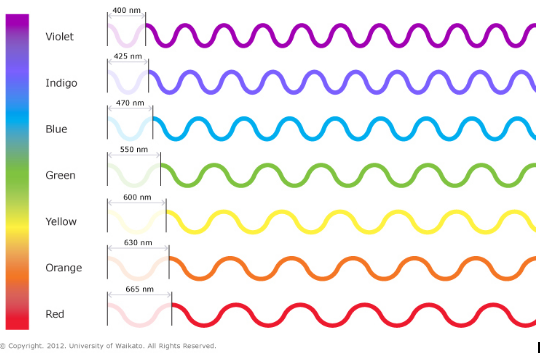
Wave: The wavelength of light can be any number in the uncountable infinity between 400nm and 665nm. It could be 400nm, 400.01nm, 400.0000001nm, 432.0001nm, 634.5445644nm, anything. This is the light wave.
When we see light (even when you look at a laser, ambient light and such) we are seeing the combination of the wave and the particle. A vast array of Individual particles that each have a specific color that is somewhere in our visible spectrum. Some are red, some are aquamarine, some are blue-green, some are #AAEEFF.
Do you think any two pieces of light are ever exactly the same? If you were to measure the wavelength of any and all of them out to an infinite amount of decimals, would some of them be the same, or if you keep looking do they all eventually differ?
Why are people so keen to call something purple but not blue-green? Purple is great, it gives me a good idea of what something looks like…But if you are going to give me purple, why not elevate all colors to the same level? Orange? Was it red-orange or yellow-orange. Do we just not have the language? Ok, roarnge and yorange, and you put the emphasis where the color puts it – “ROarnge” is a very redy-orange, “roarNGE” is a very orangy-red. I LOVE colors! Tell me about what you really see!

1 https://en.wikipedia.org/wiki/Natural_number
2 http://mathworld.wolfram.com/CountablyInfinite.html
3 http://mathworld.wolfram.com/UncountablyInfinite.html
4 https://en.wikipedia.org/wiki/Laser
Part 1: http://www.mattevanoff.com/2024/06/purple-part-one/
Part 3: http://www.mattevanoff.com/2024/06/purple-part-three/
As said before, this is a bunch of BS, please ignore me and move on.
Please Note: I am purposely making generalizations in my statements. I am aware of lasers, actual color output from monitors, and other things, but these inaccuracies do not invalidate my overall message. I assume you are adult enough to understand that absolutes don’t exist, absolutely, and that their existence does not invalidate my point. Understanding those details is left as an exercise for the reader.
Where do things stop being purple? Well, when does red stop being red? If we look back at the spectrum, orange is about 635nm, so everything with a bigger wavelength will be an orangy-red till it becomes a redy-orange. Does purple stop at that? Halfway to that? Right where it becomes more orangy than redy? Would you ever say that is a really orangy-purple? Or an orangy-blue? What about a yellowy-purple? What would that be? Is it always just brown?

I present to you here my brand new True Color Spectrum. (Figure 1) shows my True Color Spectrum, also known as The Purple Spectrum. This image contains two rainbows laid opposite superimposed over each other both with 50% opacity (that’s like “see throughy-ness”.) The top one is on a white background, the bottom on a black. As you can see it is ALL purple, except maybe kinda there near green…Just like I said last time. This is what we really see…sort of.
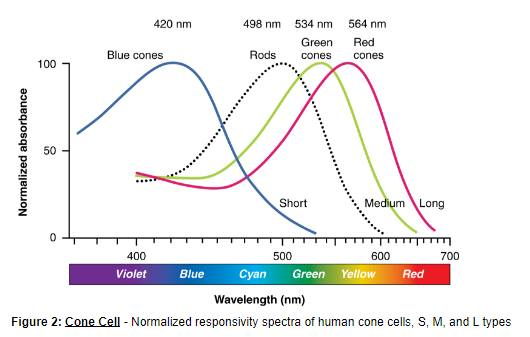
As you may remember from yer schoolins, your eyes have in them two sets or receptors, rods and cones. Rods are basically black and white, they show you how “bright” something is [lies!], while cones pick up colors. Though our cones let us see the full spectrum of colors, our perception of them is not linear; That is to say you see some colors better than others. Figure 2 shows the “color peaks” most people have, the colors they see the “best.”

As you can see from the graph humans generally have “color peaks” for blue, green, and red. Specifically, the three types have peak wavelengths near 564–580 nm, 534–545 nm, and 420–440 nm. So we actually see Those colors BETTER than other colors.

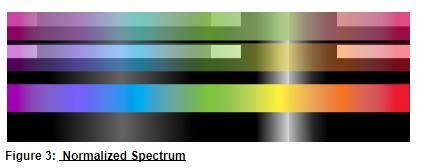
Figure 3 contains what I am calling the “Normalized Spectrum.” Unfortunately I never learned how to do computer grafix stuff, so it’s shitty, feel free to do a better job and send me it as I would love to see it. The top two bars are the two rainbows overlaid with black/white gradients with peaks around where our eyes do. The middle two are the same but a single rainbow. And the bottom image is just a normal rainbow at full color for comparison. I also left some of the background visible so you could see the gradients on it.
Colors are amazing. When we limit ourselves to seeing a forest as “green” or the sky as “blue” we are overlooking some of the amazing nuances there are to be enjoyed. Being in Asheville has allowed me to experience the seasons evolving the colors in my life in a deeper way. Seeing trees change from brown, to light green to dark to yellow, orange, red, and back to brown, and SO VERY MANY many in between, is magical. I hope you enjoy the colors you experience!
Part 1: http://www.mattevanoff.com/2024/06/purple-part-one/
Part 3: http://www.mattevanoff.com/2024/06/purple-part-three/
Don’t worry, this isn’t important. Please ignore me.

Purple
I have always found people’s lack of precision when referring to colors frustrating. When we see colors, they are not “pure” colors, they lean one way or the other. That’s not green, it’s blue-green or yellow-green. That’s not orange it’s a red-orange or a yellow-orange. Much of the time though people are happy to just say orange, and will even get annoyed if you imply there is more depth to the color.
What we perceive as color is (basically) EM waves that have a wavelength that is within our visible spectrum. Different wavelengths within that range produce different colors. This spectrum spans from violet at about 400nm through the rainbow to red at about 665nm. If you don’t remember your rainbow it goes: red, orange, yellow, green, blue, indigo, violet…Notice there was no purple? That’s because purple isn’t really single color, it’s both red and blue. “But isn’t green just yellow and blue?” I hear you saying. As it turns out, no, it’s not. Green exists at 550nm. Green exists as a color by itself. At 550nm, the color you see is green and green alone, it is not a yellowy green or a bluey green, it’s only green. Same for all of the rest of colors on the rainbow.
This does not exist for purple, there is no wavelength for purple. Purple is ALWAYS a combination of red and blue. Indigo and violet do not contain red (surprise!) The “perfect” purple would be 50% red and 50% blue, but of course, we all know perfection does not exist, so every purple you see will be at least slightly more blue or more red…Of course the same could be said for all colors.
Since all colors we experience (I know lasers blah blah blah) are at least skewed slightly one way or the other, and we have blue one end of the spectrum and red the other, they all lean to either more blue or more red. Basically around greenish, it splits, anything less than that is more bluey, anything more than that is more redy…And everything we see is going to be a combination of these, sure it’s a yellow bag, but under a microscope there will be specs of different colors throughout, right? It’s not a “perfect” material.
So, everything you see is a combination of colors some more red, some more blue. Everything you will ever see – is purple.
Part 2: http://www.mattevanoff.com/2024/06/purple-part-two/
Part 3: http://www.mattevanoff.com/2024/06/purple-part-three/
This is a primer on the ideas/ls of Agile. They are not what most people think they are, and it would behoove many people to take time to learn what they really say.
Individuals and interactions over processes and tools
Working software over comprehensive documentation
Customer collaboration over contract negotiation
Responding to change over following a plan
We …
Defined By:
It’s ok if people make mistakes if they were trying. The point is for us to do so early before we build lots on top of the broken. We need to trust each other. We don’t blame people for mistakes, we are a team, they are team problems, not individual problems
Definition of “Done”
Sprint Goals – Should be very visible and reviewed often – make sure you meet them
Burn down – Shows work as it gets completed
Burn up chart – Should how us when the product will finish, based on what is in backlog and velocity
Team makes its own rules, solves its own problems.
Team makes its own definition of “done” – It’s the TEAMS decision if QA should be removed from the “done” requirement
The team should be inspecting what they are doing to see if it is working, and change their processes if they are not.
All Scrum events are opportunities to analyze your process and refine it.
This is the POINT of Agile – Focus on Value
Product = Value
Value to Customers
What gives most value to customer?
Vertical slicing
Itemize each valuable deliverable
Defining Value
Requires Defining Value – Acceptance Criteria
Agreeing up front – helps minimize waste
FOCUS ON VALUE DELIVERED!
Short sprints allow you to fail faster.
2 week sprints you fail much faster than 4
Short sprints also show value to stakeholders more often
Team has 5 – 9 people
Dev team specifically is 3-9 people
Then you need a PO and Scrum master
Up to 12, but that gets to be a challenge, anything beyond that needs to be broken into multiple teams.
With multiple teams, Scrum masters from each team meet 2-3 times a week to coordinate efforts between teams.
Events should be timeboxed based on the length of sprints. If you have longer sprints your events will need to be longer – except Daily Scrum, which is always 15 minutes.
Every sprint should create a working product increment.
What is needed for Sprint Planning Meeting:
PO provides a list of possible items for sprint and Dev Team decides which ones to accept, with the mind toward creating a working product increment.
Sprint goal is: Summary of the work and the value that will be delivered in the product increment.
The daily Scrum (also known as standup) is a daily, timeboxed 15 minute meeting, where everyone on the team goes of:
Scrum Guide Says:
Scrum Alliance Says:
Team members can meet after Daily Scrum to talk about things that came up.
This is an ongoing process where the PO gathers information needed for items in the backlog.
ALSO: Backlog Refinement can be a meeting after the midpoint of sprint. Inspect backlog items and dev team asks for clarification on things targets for next sprint. Sounds like Octopus Grooming. Scrum Guide does not have this meeting, but Scrum Alliance does.
This is the inspect and adapt event for the Scrum team and all the key stakeholders. Product increment is the subject of the event. This is the second to last event in the sprint. Usually held in the afternoon to give the morning to finalize anything. Questions from stakeholders are encouraged! Timeboxed meeting. Probably 2 hours.
Things gone over:
Timeboxed!
The point is to demonstrate value to Stakeholders.
Stakeholders need to be at demo!
It is their opportunity to give feedback
Timing demos is important.
The higher the risk the more often you should demo.
Customer feedback need for quality
You can even demo every week instead of at the end of sprints OR Every other sprint!
They do not have to follow the sprints
More often = more informal / less often= more formal
Might make sense to demo before releases, not with sprints
Demos the stories completed in the sprint
PO or Devs can demo, then stakeholders give feedback or missing requirements (those are hopefully stories further down the backlog, but might need new stories.)
Show stakeholders the collective product as it is being built
This is a demo that gives a cohesive view of what the product looks like
This should be done for every release
Focused on Scrum team. This meeting is about how the team can make improvements for themselves and their process.
Things to review:
Then look at both lists and decide what to focus on in next sprint – you should only pick 2-3 ites to work on in the next sprint, or it will become too much. These need to stay visible to team through sprint.
MVP – Minimum Viable Product
MMF – Minimum Marketable Feature
MVP = MMF
MVP Advantage –
Backlog MUST stay prioritized with what the customer values most as the highest priority
It is the PO’s responsibility to organize the backlog – But they get their demands from the stakeholders.
The backlog exists as long as the product exists.
Items in the backlog are Product Backlog Items, or PBIs
Lots of other ways you can do it too.
Subset of backlog with the items that are to be completed in the sprint.
The Dev Team NOT the PO decides what is to go into the Sprint Backlog. This is because the goal is to create a working product increment, and the Dev Team is best suited to identify what PBIs can create a working product increment.
Everyone is involved in decision making, and you are looking for convergence, team and stakeholders.
Focuses on project goals, not what will be built.
Need Vision
Need Definition of “Done”
Ways to model things, and get feedback from stakeholders – Should be used every time you start work on new valuable deliverables
Status reports suck – don’t use them
There are the charts (burndown, etc.)
Need to have conversation with stakeholders
Forecasting short term results is a lot easier than long term (duh)
Show stakeholders the collective product as it is being built
This is a demo that gives a cohesive view of what the product looks like
This should be done for every release.
Constant planning – planning to plan
You are planning every day.
Everything is planning.
Incorporating new information into plans to reprioritize backlog.
Every time you release an MVP you need to reevaluate all of your previous plans – did the process change any of your plans? This should be a big meeting with stakeholders where everyone gets to have input on how priorities have changed. Then the backlog will need to be reprioritized.
Iteration 0 an option addition that is basically a sprint before the first sprint that allows you do to things such as:
Doesn’t have to be length of full sprint
Hardening, finalizing, testing, documenting – before product moved to production
Short (like 1 week) while team investigates PoC
Used to test new-untested technology
Used because people are better at comparative sizing than actual sizing
Fibonacci – follows normal growth patterns and normally used
Wideband Delphi: Team anonymously submit estimates to avoid bias (not actually used much)
Planning Poker: Most widely used (would have to research)
Usually senior leadership and not directly involved day-to-day
Soul accountable party for the product the team is building.
Should be a person from The Business.
Need to be able to answer Dev Team questions.
Need to be able to negotiate backlog items.
Must be able to talk with other people in business.
Makes the decisions about product vision and the features that are needed.
Represents stakeholders.
Dev team only takes orders from PO.
Responsible for maximizing value.
PO -AND ONLY THE PO- manages the backlog.
A proxy can be used if the PO can’t dedicate the full time – but the PO is ultimately responsible.
A Business Analyst can work with the PO to help them prioritize for the business.
Though the PO is responsible for the backlog they can delegate responsibility to parts of the Dev Team, especially in the case of technical issues they don’t understand.
PO Can abnormally terminate a sprint early – usually done when current work is found to have no value, and should be stopped.
PO does NOT manage the team – only the backlog
NOT the manager of the team
They manage the Scrum process, NOT the team
They instruct everyone – Dev team, Product Owner, Business – on Scrum process
They are the SERVANT of everyone
SM has their own Scrum event – Product Backlog Refinement
Who are the stakeholders?
PO, Scrum master, team, and sponsor – brainstorm on this is.
Who are direct users of the product?
Executives, manager, who in the company?
The stakeholders need to be told about Agile.
They need to be present in demos.
The Definition of Done is something that should constantly be reviewed. This is different from the Acceptance Criteria of a PBI, ACs are different for different PBIs, DoD is across the board for all PBIs. Teams should have a defined definition of done for all PBIs, and constantly be reviewing it. Possible DoDs include:
Ground rules created by team to guide the project and how team members interact.
Norms should be reviewed and updated every couple months – maybe after every MVP goes live? Should spend an hour in a norming session.
Possible rules:
Though everyone should have specific skills, team member should have general skills too, to be able to help with other tasks
When team members use secondary skills to help reach the sprint goal.
The space you are in can include:
No reason we should be looking at things like burndown during the standups
When co-located, things like standups twice a day might make sense
Usually takes 3-4 sprints to get an established velocity.
Calculating: total points done / number of sprint = velocity
Can be used to calculate how much longer project will take
Can have brainstorming meeting about risk:
Goal to just ID possible threats
Assess how likely to happen, and how bad it will be if it does
Should be considering risks in planning meetings
Agile is based on Kaizen (hey my mom did that in the 90s!)
This means improving the quality of the work by making small adjustments over time
The Retrospective is a clear use of this idea. It is asked:
A way to identify and eliminate a system’s waste without affecting productivity.
Adapted from manufacturing.
Value Stream – The path a new idea has to go through to get to the customer
This should be mapped out, and you can then see where you can make it better
You can map any processes Value Stream – like deployment process, and see where the problems are.

For this post I am talking about in React when you use (see: https://react.dev/reference/react/useState):
const [foo, setFoo] = useState(“bar”);
And then you use:
setFoo(“fizz”) ← This right here
Let me ask you a question:
Is setState Asynchronous?
Trick question, the answer is “Well, it’s really complicated, and you should just assume it is.”
However…If you want more information about it, I can give you an answer in several parts…It’s complicated.
I feel like the true answer depends on the exact definition of “asynchronous.” So let’s explore how `setState` actually works.
Going deeper:
setState executes in two parts, the first part executing immediately, the second part executing later, however that second part is immediately added to the event loop…Actually that second part isn’t totally true. It’s not technically added to the event loop – it tells React that it needs to re-render, the check for that is already on the event loop in React’s internal event loop…So technically, it’s not added to the end of the event loop, basically a flag is set saying “do a re-render” and that re-render happens after the current render finishes, when React gets to that check in its internal event loop.
We need to be clear about two different parts of state in React for this to make sense.
foo.These two states are sometimes the same, and they are sometimes different.
The first thing it does is execute an update to React’s internal state (#1 above). That is totally immediate, and I don’t think anyone would argue that it is asynchronous.
When React’s internal state is updated, React tells itself “I need to do a re-render.” This re-render however is deferred till after the current render cycle is completed.
This means that the state inside your component (in the example at the top foo, #2 above) is NOT updated till that re-render. The state inside your component only ever changes during render. This is true for anything involving state in your component. More simply: component state only ever changes during the render cycle.
So, is that second part asynchronous?
Well, you can’t await is, so no, it’s not, end of story…Except you can’t await setTimeout and I think we generally agree that setTimeout is asynchronous…You can however wrap setTimeout in a Promise and you can await that…Turns out, you can also wrap a setState in a promise and await that…But don’t ever do that because it makes React unhappy and throw errors.
Fact: React will always execute setStates in the same order, so the last one will always be the final value.
Fact: You need to use an updater function if you want to access the current internal React value (#1 above) – meaning, if the current render has updated the state, the only way to see that updated state is in an updater function.
Fact: You CANNOT access the current internal React value of a DIFFERENT state value (during the current render cycle) in your component, even in an updater function. Meaning, if you have two state values, and you update one, then you update the second one – with or without an updater function – you will ALWAYS get the un-updated value of the first one. Why: Because component state (#2 above) only changes on the re-render, and that doesn’t happen till after the current render completes.
By “asynchronous” do we mean “doesn’t execute immediately?” Do we mean “Is added to the microtask queue?” …Does setTimeout(..., 0) count as asynchronous? A lot of what I read says “does not hold up execution” which well, it doesn’t, except it does after other stuff…
Well, that lead me to reading the ECMAScript spec about setTimeout and I couldn’t discern if setTimeout(..., 0) is added to the event loop, added to the microtask queue, one of the previous but with a slight delay, or something else…I’m actually not sure that the behavior is defined – If someone smarter than me knows the answer to this please let me know.
What I do know is that a setTimeout(...,0) will always execute after the re-render cycle (I know this because it obviously isn’t part of React’s render cycle and always is the final update – in my testing) – meaning, that if you have a setTimeout(...,0) that sets the state, as well as other settings of the same state, the final value will always be the one set inside of the setTimeout(...,0) …Except that I say “always” and I actually don’t actually know if that is true. It is true in my testing. If that setTimeout is added to the microtask queue, in between other tasks that set that state, then it is possible that it won’t be the final value…but I don’t know if it is…but generally it is true – at least in my testing…And again, I’m not totally positive that is even defined in the spec…and we are splitting hairs here.
Because I don’t think that is complicated enough, React was kind enough to make running in dev mode as opposed to prod work differently. Well, kind of. If you are using an updater function, React will update twice in dev mode, and once in prod. Why? Oh god how deep does this hole go?
Short answer: it should be a pure function. (see: https://en.wikipedia.org/wiki/Pure_function & https://react.dev/learn/keeping-components-pure)
Technically when React tells itself it needs to re-render, it applies the update to that component state var (#2) to it’s queue with the current internal value (#1) of the variable – meaning that changes to that variable inside of an updater function ARE NOT SEEN – as the original value was already applied, when the call was queued. So if you update the state of the variable inside of an updater function, and then try to update it again later with an updater function, the first update is ignored. Meaning: that’s a really bad idea. So, in dev mode React will run it twice, once with the first value, once with the second value, and if they are different, ya done goofed. The reason it does this in dev mode is to show you that you goofed.
So again, how is “asynchronous” technically defined? And is it asynchronous? IDFK.
I say setState is not asynchronous because the execution order is defined, and everything it does is immediately added to the the event loop when it is called – if you know what you are doing, the results are deterministic, you absolutely know what the final result will be. I say please don’t ever rely on this, because the next person who has to modify the code – including future you – is generally not smart enough to understand the nuances here, and if your code relies on this behavior, they will likely break things.
I also say it is asynchronous because part of it executes out of order, and we can (in theory) use a promise to `await` it.
Additionally – because this behavior is so esoteric, I don’t know that it will not be changed in React, sometime the future.
ALL OF THIS IS WHY I SAY TO JUST TREAT IT AS ASYNCHRONOUS!
I probably made some technical mistakes above…Though I do think it is basically correct. What I wrote is based on my reading many things, watching many things, and a butt load of tests I wrote myself….Really, I should have saved those tests so I could post them…If you want me to reproduce and post those test, let me know.
PLEASE LET ME KNOW IF ANYTHING I WROTE ABOVE IS INACCURATE.
I have been using Github Copilot for software development for the past year, and my company is now starting to use the corporate version, and I’m even getting Microsoft’s training. Using AI for software development is clearly the biggest change to happen to the industry since the internet, and it is important to continually evaluate how useful and effective we find new tools to be. My results range from as a friend described it “autocomplete for my brain” – to, actively making my job harder, my work slower, and (if not checked) having more bugs.
The benefits of Copilot (I will be using Copilot and general AI for software development rather synonymously, but not totally in this post…I assume you are an adult and can figure it out) are clear to many of us who have used it for any extended period of time. I do not know if it reads my clipboard, or is just good at guessing, but its ability to know that I want to add a specific variable to a string, or in a log is uncanny. When debugging a problem I have even seen it know when I click on a specific line, exactly what I want to log before I do anything – then when I verify the problem is what I believed it to be, when I then click on a different line, it knows the correct fix. I have really had some mind-blowing moments.
Another thing AI can be great for is refactoring. A lot of refactoring isn’t “hard” so much as “long and tedious” where it is easy to miss something here or there and break functionality. In my experience Copilot does a good job of helping refactor without missing things – something I have always struggled with when using say a VSCode extension for refactoring. I fully admit my experience using extensions is limited as every time I have tried to use them, I get frustrated and just say “fuck it, I’ll do it myself!”
An additional area where I see a benefit using AI tools is when there is something I don’t quite know how to do. For instance, when I want to unit test a piece of code, but I am not sure how to build the scaffolding needed for the unit test to function – literally the worst part of writing code – many times Copilot can help at least get me started down the right path.
This however leads us directly into my first major problem with using AI. When we talk about unit testing, AI really wants to help you do it. It can be great for quickly generating scaffolding. The problem arises with what checks the tests actually perform. When you ask AI to unit test code for you, it usually just tests that the code does what you programmed it to do. This isn’t just unhelpful, it is actively harmful. Much of the point of writing tests is to catch problems, if the test simply checks that the code does what you programmed it to do, that is a bad test. We need tests that catch the mistakes in what we programmed. Otherwise we have a not just a false sense of security but an actively bad sense of security.
Following that problem is the one I have with AI writing code for me. When I write code, I write code to do something, and I know what I intended it to do because I wrote it to do that. Many times AI wants to take the wheel and complete the logic for me. Though this is nice in theory, reading and understanding code you didn’t write takes longer, and is harder than just writing it yourself. I have had experiences where Copilot has written 3-4 lines, or even an entire block of logic, and the amount of time it takes me to analyze it to verify that it is doing what I want, and doing it correctly, actually takes longer than just writing it myself. Basically it is like I have to review a PR – the other worst part of development. And yet, we all look to StackOverflow…And some of us looked to help files and books before the internet existed. Sometimes it can be useful in that it might show me a path I may have forgotten, still many times it is slightly not quite correct, or even if it is, it was harder, and took longer for me to use its code. If it is incorrect…How many developers are actually taking the time to analyze this code correctly? Well, how many currently do it in PRs? YMMV.
I have also found code-reuse to be another issue with AI generated code. Though I don’t believe that every line has to be as DRY as possible, I do believe that code reuse is important. Moving functionality that does the same thing to a single location helps prevent bugs because the “same” logic isn’t rewritten multiple times, it also makes updating logic easier because it only exists in one place. I have found that AI isn’t super helpful for this. It doesn’t suggest I refactor out code from before because I am doing the same thing here. It doesn’t suggest I build some kind of factory instead of generating the same objects over and over. It doesn’t know or care that I’m doing this.
The last area I have found AI to be a large problem is learning new things. And yet, I do think it can learn these these skills. It can – possibly – be an amazing instructor.
I recently decided to learn some Rust for fun. After about an hour of work I found I had to completely turn off Copilot. Having autocomplete try to help me with everything when I know nothing just means I learn nothing. I keep hitting autocomplete and nothing ever cements in my brain. What can be helpful is when I get stuck, using the Copilot chat to try to help. This way it never tries to help me until I ask it to. I can ask for help on how to do something new – help is never bad. Blindly listening is totally unhelpful.
In general I have found AI to be helpful in MY workflow – I have reservations about other developers, most especially junior developers using it. I worry that people will not fully vet the code that it gives them. I worry that people will generate tests that make them believe their code is safer than it is. I worry that people won’t actually LEARN. That said – did we not have the same concerns with things like StackOverflow? I think we can all admit SA has become less useful over the last 5 to 10 years. I rarely even care about results that are more than a year old. Issue trackers, forums, and conferences are much better sources of information. Perhaps AI is what is needed to replace legacy tools like SA. What I do know for sure is that if my 8-year-old self had something like Copilot when I first started coding, I would have loved it, just as I loved the QBasic help files when I was that kid.
Well, I hit the “update” button in WordPress and it hosed my site.
It took a lot of fighting to get it working again.
My content is – mostly restored, but there are still issues with old posts and code and things.
I spent a while trying to make it useable – but most of the code stuff is jQuery, and I haven’t written jQuery in nearly a decade, so I don’t really have any plans to go back and fix the problems any more than I already have. It’s already eaten too much of my time.